Skip to content
homesdesignai
Home office ideas

AI Office Design for a Home Workspace You Want to Use

Upload a photo of a spare room, bedroom corner or existing office and see it redesigned as a workspace, with a new desk setup, storage, lighting and a background that looks good on video calls.

Your photos stay private to your account.

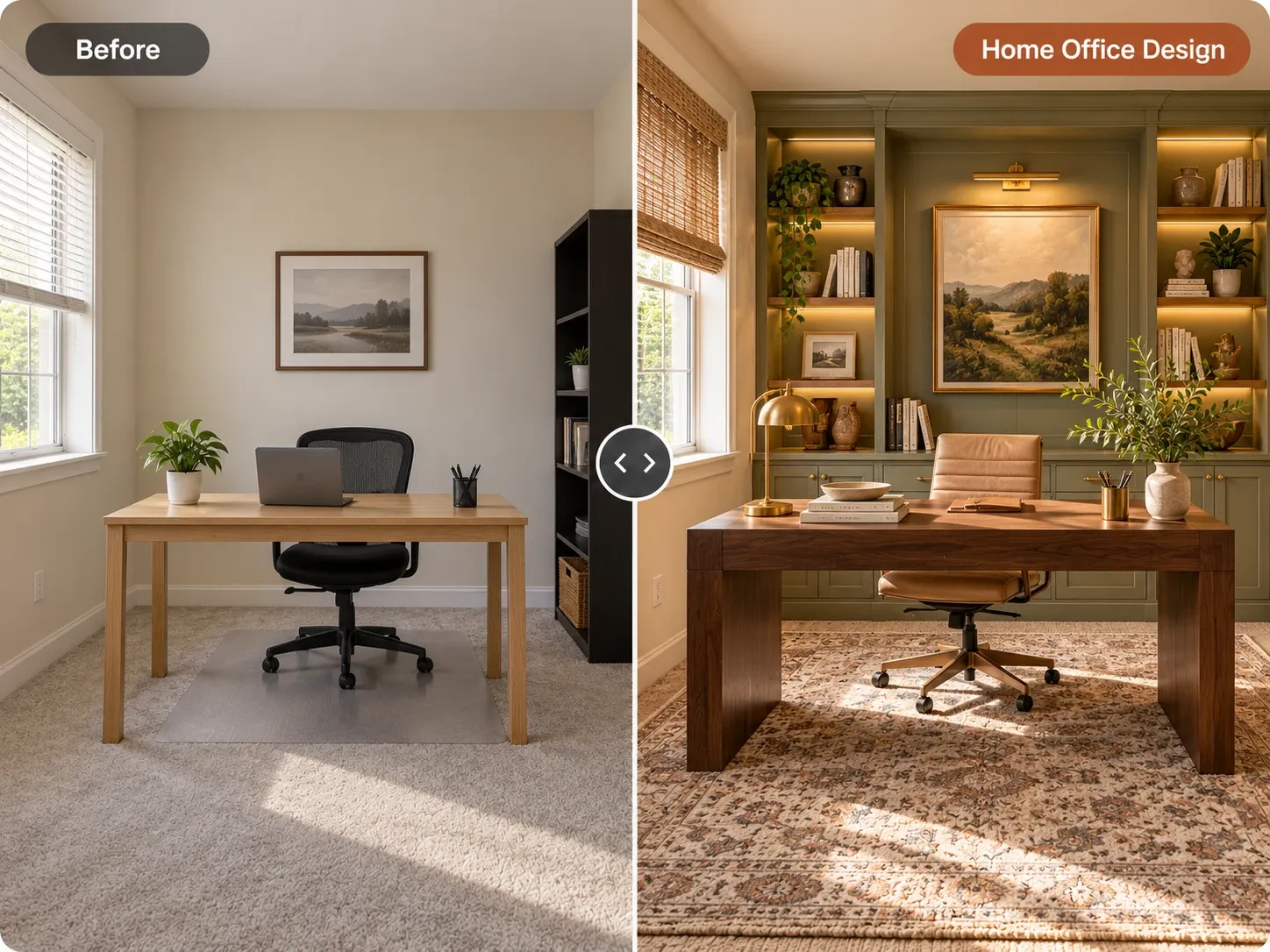
Before and after: bare home office redesigned with sage built-in shelving, a walnut desk and a leather chair

AI Home Office Design examples

Inspiration in different styles to guide your own design.

Popular styles for this space

View all styles

What you can do with AI Home Office Design

How it works

Three steps from photo to finished concept.

  1. 1

    Photograph the workspace

    Capture the desk area and the wall behind your chair in daylight. If you work in a shared room, include enough of it to show the surroundings.

  2. 2

    Pick Home Office and a style

    Choose a style like minimalist, mid-century modern or industrial, then add details such as 'walnut desk on the side wall, shelves behind, keep the window'.

  3. 3

    Generate and fine-tune

    Compare several setups, then refine the backdrop, storage or lighting one instruction at a time until the space feels ready for focused work.

AI Home Office Design guide

How AI office design works on your photo

The AI keeps the shell of your room, including walls, windows, doors and the camera angle, and redesigns what sits inside it: desk, chair, shelving, lighting, wall color and decor. That makes it useful for an existing office that feels uninspiring, for a room that has never been a workspace, like a guest bedroom, and for small studios or shop offices too.

The images are design concepts. They show what a setup could look like, not whether a 60-inch desk fits between the window and the radiator. Measure the wall you plan to use, check outlet locations and network access, and pick furniture by its listed dimensions. Then use the concept as your shopping and styling guide.
Desk placement, light and ergonomics

Where the desk sits relative to the window matters more than any furniture choice. Placing the desk perpendicular to the window brings daylight in from the side, which avoids glare on the screen and shadows on your face. Facing the window is pleasant but can backlight you on calls, while sitting with the window behind you throws glare straight onto the monitor.

Ergonomic basics are easy to check against any concept. The top of the monitor should sit at or slightly below eye level, about an arm's length away. A fixed desk is typically 28 to 30 inches high, with elbows close to 90 degrees when typing and feet flat on the floor or a footrest. Leave about 36 inches behind the desk so the chair can roll back comfortably.

  • Desk perpendicular to the window for glare-free daylight
  • Monitor top at or just below eye level, an arm's length away
  • Desk height around 28 to 30 inches, or adjustable
  • About 36 inches of clearance behind the chair
  • Task lamp on the side opposite your writing hand

Designing a better video-call background

Your camera sees one wall for hours each week, so it deserves deliberate design. A shelf with a few books, a plant and a framed print reads as organized without being distracting. Avoid setups that put a bed, a laundry rack or a bright window behind you. If the desk cannot move, an accent wall in soft green, terracotta or deep blue gives the background depth.

Ask the AI for two or three backdrop versions of the same wall and judge them at the size of a video tile, which is small. Simple shapes and a few strong colors work better than busy gallery walls. Warm light from a lamp beside or behind the camera usually flatters skin tones more than a cool overhead light.

Small-space and shared offices

Many home offices live inside another room. A closet with the doors removed can hold a 24-inch-deep desk with shelves above and a light strip under the lowest shelf. A guest room can pair a daybed with a wall-mounted desk. In a living room, a narrow console desk behind the sofa keeps work compact. The home office ideas page covers more setups.

When the office shares a room, choose furniture that matches its surroundings so the workstation does not look temporary. Generating the whole room in a style like Scandinavian or minimalist keeps the desk area consistent with everything around it. If you need to rethink where everything goes first, the AI furniture placement tool can suggest new arrangements.

Frequently asked questions

Is there a free AI office design tool?

Yes, you can start free with an account and redesign your own office or spare room. Paid plans include monthly credits if you want to explore many layouts, design several rooms or create office concepts for clients. There is nothing to install, since it runs in your browser.

Can I design an office in a bedroom or living room corner?

Yes. Upload a photo of the corner and add an instruction such as 'add a compact desk and shelving by the window, keep the bed'. The AI works within the existing room, so you can see how a workstation fits alongside the furniture already there.

Will it keep my existing desk or shelves?

It can. Name what to keep, for example 'keep the white desk and bookshelf, change the wall color and lighting'. The AI keeps the room's structure and aims to preserve the items you mention, though small details may vary between versions, so generate a few.

Does the AI handle ergonomics?

Not directly. The images show appearance and arrangement, not chair settings or exact desk heights. Use the ergonomic checklist on this page, such as the monitor at eye level and about 36 inches behind the chair, to judge any concept, then buy furniture by its real dimensions.

Can I use the designs for a client's office?

Yes, you can use your generated images for personal and commercial projects such as listings and client presentations. Designers and organizers can use them to show a client a few workspace directions before ordering furniture.

Is my office photo private, and does it work on a phone?

Your uploads are private to your account; we don't publish them, which matters when a photo shows your desk, screens or documents. The tool works in mobile and desktop browsers, so you can shoot and upload straight from your phone.

Try AI Home Office Design on your own photo

Upload a photo, pick a style and compare redesigns side by side.

Related AI tools

View all tools

Ideas to try

More ideas