Skip to content
homesdesignai
Design ideas

Home Office Ideas for Focus, Comfort and Better Calls

A good home office supports eight hours of sitting, typing and video calls without straining your neck or your patience. These 11 ideas cover desk placement, ergonomics, cables, storage and what the camera sees behind you, plus ways to fit a workspace into a closet or the corner of a bedroom.

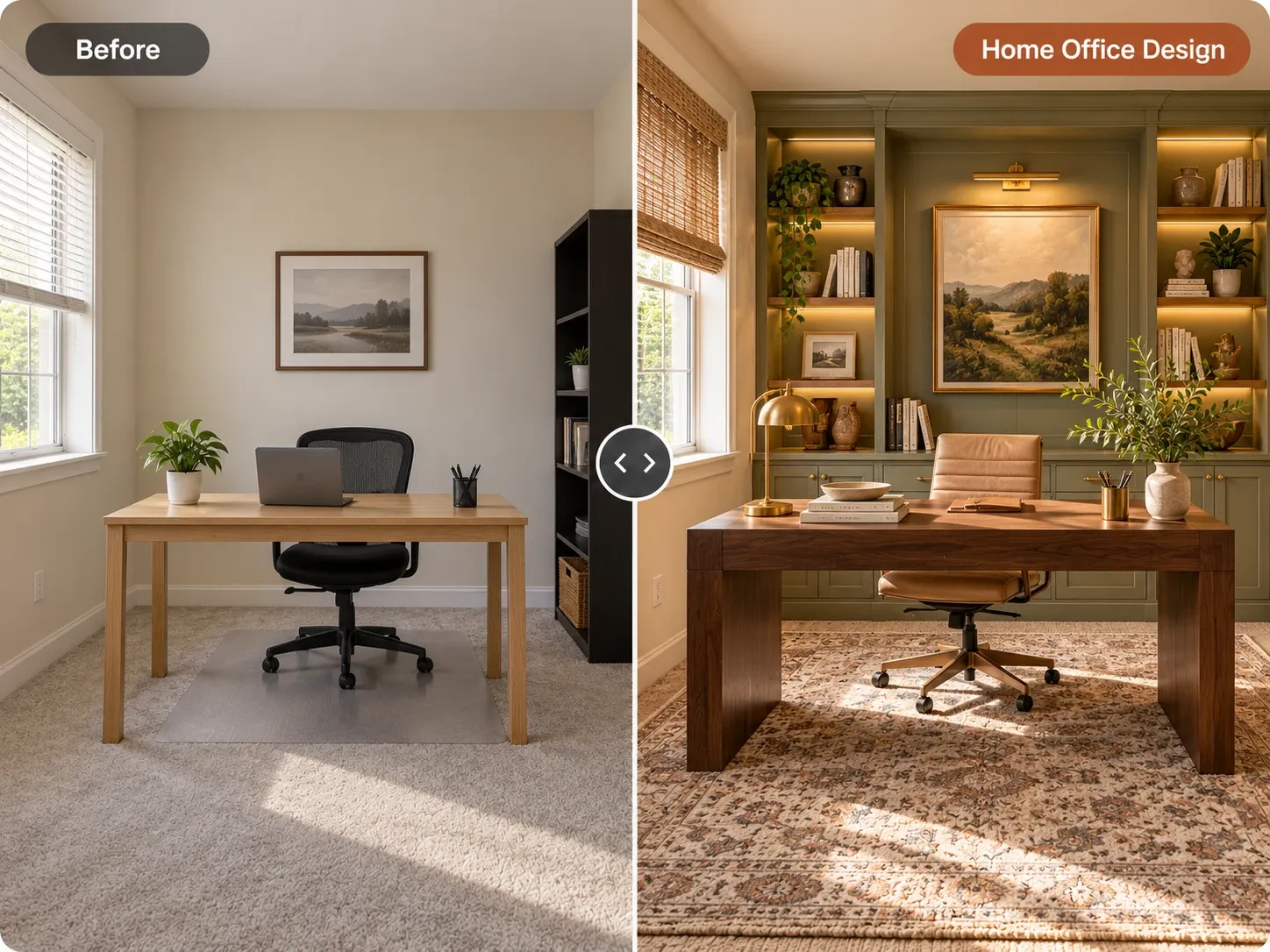
Before and after: bare home office redesigned with sage built-in shelving, a walnut desk and a leather chair
  1. Home office with a wooden desk and blue chair

    1. Put the desk perpendicular to the window

    Placing the desk at a right angle to the window gives you daylight from the side, which avoids glare on the screen and keeps your face evenly lit on camera. It also lets you look up and rest your eyes on a distant view. If you are right-handed, light coming from the left keeps your hand from casting shadows across paper.

    Try this idea in Scandinavian style
  2. 2. Or face the window, with the right shades

    Facing the window gives you the best view and puts soft light on your face for calls. The tradeoff is bright light behind the monitor, which tires your eyes. Fix it with light-filtering solar shades or sheer linen panels that cut brightness without blocking the view, and raise the monitor brightness a notch during the day.

    Try this idea
  3. Home office desk with a monitor

    3. Set the screen and chair to your body

    Position the monitor about an arm's length away, 20 to 30 inches, with the top of the screen at or slightly below eye level. Your elbows should rest near 90 degrees with the keyboard at or just below elbow height, and your feet flat on the floor. A standard 29 to 30 inch desk fits many people; a sit-stand desk solves it for everyone in the household.

    Try this idea
  4. 4. Spend on the chair before the desk

    A plain desk works fine for years; a poor chair hurts within weeks. Look for adjustable seat height and depth, adjustable lumbar support, armrests that drop below desk height, and a breathable back. Test it for at least 20 minutes if you can. In a design-led room, a task chair in a wool or leather finish blends in better than a gaming-style chair.

    Try this idea
  5. 5. Hide every cable

    Mount a cable tray under the back edge of the desk, screw a surge protector to its underside, and run a single sleeve or raceway from the desk to the outlet. A monitor arm lifts the screen off the surface and routes its cables down the arm. The goal is a desk with nothing on it but what you use, which looks better on camera and is easier to clean.

    Try this idea in Minimalist style
  6. 6. Closed storage low, open shelves high

    Store paper, printer supplies and chargers in closed cabinets or a lateral file below 30 inches, where clutter is out of sight. Keep open shelving above for books and a few objects you like. This split gives you a calm room and a tidy background for calls. Choose cabinet fronts in the wall color so the storage recedes.

    Try this idea
  7. 7. Design the wall behind you for video calls

    The wall behind your chair is what colleagues see every day. Sit 3 to 6 feet in front of a styled bookcase, a single large print, or a textured paint color so the background has depth without distraction. Avoid sitting with a bed, a door or a bright window behind you. A soft light in front of you, slightly above eye level, does more for calls than a new camera.

    Try this idea in Mid-Century Modern style
  8. Minimal white desk with a wooden chair

    8. Turn a closet into an office

    A standard reach-in closet is about 24 inches deep, which is enough for a built-in desk surface 20 to 22 inches deep. Remove the doors or replace them with bifolds that fold flat, add a shelf or two above the desk, and mount an LED strip under the lowest shelf for task light. Have an electrician add an outlet inside if there is none.

    Try this idea in Japandi style
  9. 9. Give a bedroom corner its own zone

    When the office shares a bedroom, define it with a rug, a wall-mounted shelf and a desk lamp so it reads as a separate area. Place the desk so you cannot see it from the bed, or close it off at night with a folding screen or curtain on a ceiling track. Matching the desk wood to the nightstands keeps the room cohesive.

    Try this idea
  10. Sunlit home office corner inside a living room

    10. Carve a nook out of the living room

    A 4-foot stretch of wall beside a window is enough for a compact desk and a chair. Use a desk no deeper than 20 inches, a wall sconce instead of a floor lamp, and a closed box or basket to put the laptop away at the end of the day. A chair that matches the living room seating keeps the nook from looking like an afterthought.

    Try this idea
  11. 11. Color and soft surfaces that calm the room

    Muted greens, soft blues and warm grays are easy to look at for hours and read well on camera. Pair them with a wool rug, lined curtains and a fabric-covered pinboard, which absorb sound and reduce echo on calls. Light the room in layers: a dimmable ceiling fixture, a task lamp at 3500K to 4000K for focus, and a warm lamp for evening.

    Try this idea

Upload your room and test these ideas

Your photos stay private to your account.

Planning guide

Planning a home office that lasts

Decide first how you work: two monitors and a printer need a 60-inch desk, while a laptop-only setup fits in 36 inches. Then choose the location by light, outlets and noise, not by which room is empty. A door you can close matters more than square footage if you take frequent calls.

Put the budget into the chair, the lighting and a solid desk surface, in that order. Built-ins and added outlets are worth it if you plan to stay; renters get most of the benefit from a monitor arm, a good lamp, a rug and freestanding shelving. Adding a new circuit or hardwired lighting typically requires a licensed electrician and may need a permit.

Test a home office layout on your room photo with AI

Take a photo of the empty or current corner from the doorway, with the window visible so the AI can read where light comes from. Shoot in daylight, phone level at about chest height, and include the floor and the wall where the desk will go.

Upload it to the AI home office design tool and be specific: "keep the window and walls, add a white oak desk perpendicular to the window, black task chair, closed cabinets below open shelves, muted green walls." The tool returns a photorealistic image of your own room with that setup, so you can check whether the desk crowds the door or blocks the light.

Try two or three versions: the desk facing the window, the desk on the side wall, and a version styled for your video background. Seeing them in your room makes the choice obvious and gives you a shopping reference for the desk size and colors.
Frequently asked questions

Should a desk face the window or the wall?

Perpendicular to the window is usually best, because side light avoids screen glare and lights your face evenly on calls. Facing the window is a good second choice if you add light-filtering shades. Sitting with your back to a window tends to cause screen glare and a dark, backlit face on video.

What is the best wall color for a home office?

Muted, mid-tone colors such as sage green, soft blue, warm gray or greige work well because they are restful for long hours and look natural on camera. Very bright whites can feel stark under daylight, and saturated reds or oranges can be distracting. Use an eggshell finish so the wall does not reflect glare.

How do you fit an office into a bedroom?

Pick the corner farthest from the bed, define it with a rug and its own lamp, and choose a compact desk 20 inches deep or less. Keep work supplies in closed storage, and if possible place the desk so it is out of sight from the bed. A folding screen helps separate work from rest.

Can AI help me design my home office?

Yes. Upload a photo of the room and the AI home office design tool returns realistic redesigns of the same space with new desk placement, storage, colors and lighting. It is a visual guide for choosing a direction, not a measured plan, so confirm desk and chair sizes before buying.

See these ideas in your own space

Open AI Home Office Design, upload a photo and compare variations side by side.

More design ideas

All ideas

Styles that work well here

All styles